
Freelance Day Rate Calculator (TJM)
freelance day rate calculator
1) Your current rate
2) Baseline assumption
3) Work capacity
Advanced: billable days breakdown (optional)
4) Costs & buffers
| Target net income (annual) | €0 |
| Business expenses | €0 |
| One-time costs (year 1) | €0 |
| Taxes & contributions (est.) | €0 |
| Safety margin | €0 |
| Unpaid invoices risk | €0 |
| Conservative | €0 |
| Recommended | €0 |
| Aggressive | €0 |
How does the Freelance Day Rate Calculator work?
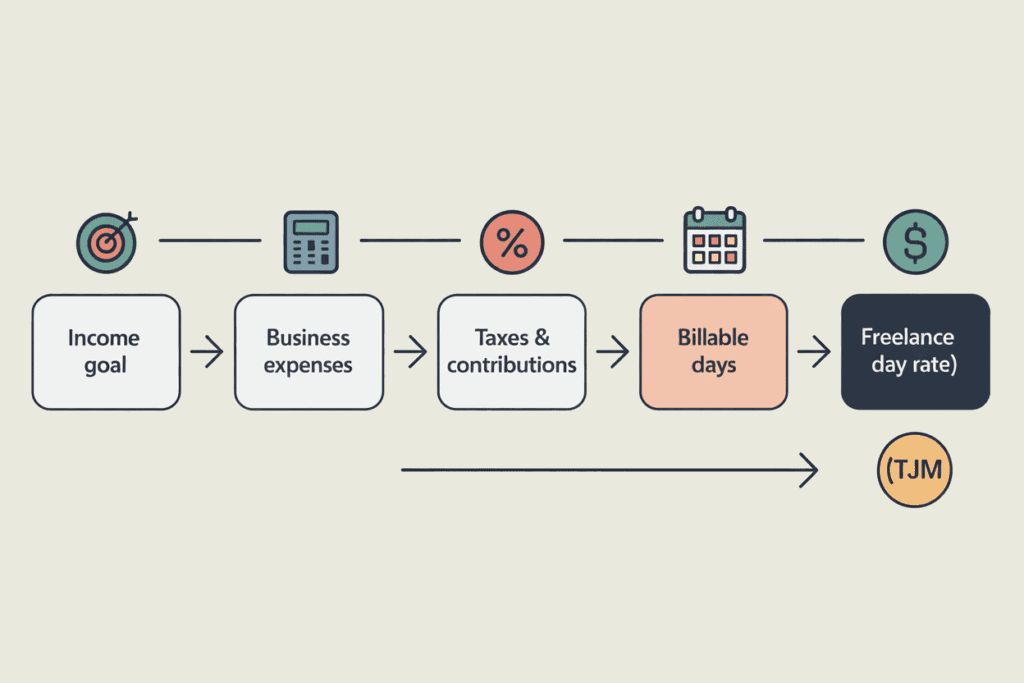
This freelance day rate calculator (also known as TJM – Taux Journalier Moyen) helps you estimate a realistic daily and hourly rate based on your personal income goals, working capacity, business costs, and risk factors.
Instead of guessing a price or copying market averages, this tool works from the inside out:
- Start with how much you want to earn.
- Factor in how much you can realistically work and bill.
- Add expenses, taxes, and safety buffers.
- Calculate the revenue and rate required to reach that goal.
All calculations run locally in your browser. No data is sent or stored.
Step-by-step explanation of each field
1) Income goal :
Currency
Choose the currency you work with. This only changes the symbol (€ $ £ etc.), not exchange rates.
Target net income
This is the amount you want to earn for yourself, after expenses but before personal lifestyle choices.
Example:
- €4,000 per month
- or €48,000 per year
Target period (Monthly / Yearly)
Select whether your income goal is monthly or yearly.
The calculator automatically converts monthly goals into annual targets for consistency.
2) Work capacity
Working days per year
The total number of days you are theoretically available to work.
Typical values:
- 200 to 230 days per year
- 220 is a common default
Hours per day
Used to calculate your hourly rate from the daily rate.
Most freelancers use:
- 7 to 8 hours per day
Utilization rate (%)
This is one of the most important fields.
It represents the percentage of your working time that is actually billable to clients.
It accounts for:
- prospecting,
- admin,
- emails,
- breaks between projects.
Typical ranges:
- 60 % → conservative
- 70 % → realistic
- 80 % → very optimized
Unpaid invoices risk (%)
Optional buffer to protect you against:
- late payments,
- unpaid invoices,
- cash flow issues.
Even a small value (2–5 %) can significantly improve realism.
Advanced: billable days breakdown (optional)
This section helps you validate your utilization rate using real-life constraints.
You can enter:
- vacation and holidays,
- sick days,
- admin and accounting time,
- marketing and prospecting days.
The tool compares this breakdown with your utilization input and warns you if there is a large mismatch.
This makes the result much more credible.
3) Costs & buffers
Annual business expenses
Everything required to operate your activity:
- software,
- hardware,
- insurance,
- coworking,
- ads,
- tools.
One-time costs (year 1 only)
Optional costs such as:
- laptop purchase,
- training,
- business setup.
Taxes & contributions (%)
Estimated percentage for:
- income tax,
- social contributions.
This varies by country and legal status.
If unsure, use a conservative estimate (25–35 %).
Safety margin (%)
Extra buffer for:
- slow months,
- unexpected costs,
- stress reduction.
A margin of 5–15 % is common for freelancers.
Understanding the results
Recommended day rate (TJM)
This is the daily price you should charge to realistically reach your income goal.
Recommended hourly rate
Automatically calculated from:
- day rate,
- hours per day.
Useful if clients ask for hourly pricing.
Billable days (estimated)
The number of days you are expected to invoice during the year, based on your utilization rate.
Required annual revenue
The total turnover you need to generate to:
- pay expenses,
- cover taxes,
- include buffers,
- reach your net income goal.
The 3 scenarios explained
The calculator provides three pricing scenarios:
Conservative
Higher safety margins and lower utilization.
Useful when:
- starting out,
- working with unstable clients.
Recommended
Balanced and realistic for most freelancers.
Aggressive
Higher efficiency and lower buffers.
Suitable for:
- experienced freelancers,
- strong positioning,
- high demand niches.
These scenarios help you adapt your pricing strategy depending on your market.
Example calculation
Let’s say you want:
- €4,000 net per month,
- 220 working days per year,
- 70 % utilization,
- €4,000 yearly expenses,
- 30 % taxes,
- 10 % safety margin.
The calculator shows that you should charge approximately:
- €540–550 per day
- €65–70 per hour
This ensures you are paid fairly without underpricing your work.
Frequently Asked Questions
Is this tool accurate?
It is an estimator, not financial advice. Accuracy depends on how realistic your inputs are.
Does it include VAT?
No. VAT or sales tax is usually added on top of your rate depending on your country.
Can I use this tool for any country?
Yes. The logic is universal, but tax rates must be adjusted manually.
Is my data stored?
No. Everything runs locally in your browser.
To explore more free tools designed for freelancers, writers, and digital creators, visit our
Free Online Tools
section on Scriptobits.
For country-specific tax rules or legal advice, we recommend consulting your local tax authority or a certified accountant, or referring to official resources such as the
OECD tax guidelines
.